WorkBC Website Redesign
Shaped by technological innovation, sustainability, and a diverse workforce—British Columbia’s current labour market presents notable challenges and opportunities, in the quest for viable employment options and exceptional talent.
Given the widespread relevance of WorkBC subject matter—it was incredibly rewarding to be involved in this project, and to create a resource with positive provincial impact. Below is the story of how our team connected with British Columbian’s to inform the redesign of WorkBC.ca: a key resource for navigating the B.C. labour market.
In compliance with my non-disclosure agreement, I have omitted confidential information from this case study.

Background
The What, Why and Who of WorkBC
The WorkBC website serves as a comprehensive online resource for employment and career-related information and services in the province of British Columbia. Some of the primary objectives and features of WorkBC include:

Job Search and Matching
WorkBC offers a job board that allows individuals to search for employment opportunities in various industries and regions within British Columbia. It also provides tools to match job seekers with suitable job openings.

Career Planning and Development
The WorkBC website provides a wealth of resources for individuals looking to plan, develop, and advance their careers. This includes information on education and training programs, career exploration tools, and personalized guidance.

Skills Assessment and Training
Through the WorkBC website, job seekers can access tools and resources to assess their skills, identify areas for improvement, and explore training options.

Labour Market Information
WorkBC provides up-to-date labour market information, including job trends, wage rates, and industry outlooks. This data helps job seekers make informed career decisions, and assists employers in understanding the local labour market.
The Why of WorkBC
For a multitude of reasons, WorkBC stands out as a key resource for navigating the B.C. labour market. It offers an extensive array of tools and resources, serving as a one-stop-shop for all things related to employment. Users benefit from up-to-date information, including current labour market data and job postings—ensuring they have access to the latest insights. Additionally, the platform fosters community engagement by connecting users with local resources and support services, promoting collaboration in workforce development efforts.
Who is WorkBC For?
The WorkBC website serves as a versatile resource catering to a diverse range of users. Job seekers benefit from its job search tools, career resources, and skill development opportunities. Employers find value in its streamlined hiring processes, access to labour market information, and insights into government workforce development programs. Educators and training providers can utilize the platform to showcase their offerings, aligning them with the demands of the labour market. Additionally, government and workforce development agencies rely on WorkBC for disseminating crucial information, gathering up-to-date labour market data, and championing employment initiatives.

Challenge
Easy to Navigate and Easy to Understand
The goal for the redesign of WorkBC was to support all British Columbians along their journey, as they navigate the provincial labour market. Given that WorkBC is a comprehensive online resource with a considerable amount of information, data, and unique career and employment focused tools—it was paramount that accessibility, consistency and scalability were baked in from the outset of the redesign. Serving an especially large and diverse user base—accessibility concerns were a top priority throughout the project, necessitating an intuitive information architecture and streamlined navigation. At a high level, our ambitions were to refresh an established provincial resource—placing the needs of British Columbians at the very center to improve their experience through the B.C. labour market.
High Level Goals
1.
Improve the navigation of WorkBC, to ensure that all users are able to locate relevant information with speed and ease.
2.
Ensure that information featured on the website is presented in a manner that adds value and can be easily understood by WorkBC's diverse user group.
3.
Increase user awareness and engagement with WorkBC through global updates to the content, design, and layout of the website.
My Role
I worked as a UX designer on the WorkBC website redesign project—in collaboration with a fellow designer and a team of developers. Within this project, I worked on deliverables including iterative UX/UI concepts, wireframes, prototypes and service blueprints. Additionally, I was responsible for facilitating, and in many cases leading, the user testing sessions that provided crucial insights to inform our UX/UI decisions. Over the course of the WorkBC redesign project, I was also responsible for writing comprehensive usability testing summaries and reports for the client.
Insights
What Did User Testing Reveal?
By conducting user testing sessions, our team was able to connect with a diverse group of British Columbians to gain invaluable insights about the direction of the WorkBC redesign. We received direct user feedback that shed light on aspects including the usability, clarity, and overall satisfaction with the WorkBC website. These sessions equipped us with a deeper understanding of user behaviour, their preferences, and the pain points they encountered through their journey on the site.
"The NOC number here, this really needs an explanation of what it is and where to find one."
"People coming from a different country—there needs to be something for them to understand what credentials and experience apply, and are needed."
"Making the website more intuitive would be great! Some info is hidden in places you wouldn't even think."
"Less clicks overall on the site!"
"When clicking on the top navigation—make the next level more clear!"
"I would like to see jobs not only for Indigenous people, but also jobs for people who want to work in the field of supporting Indigenous people."
"This 'Find a Job / Post a Job' is a great feature!"
"These 'Top News' articles here are a little unclear to me."
Seen above: a small selection of quotes from throughout the user testing process. The comments, questions, and suggestions provided during user testing were essential in the success of the WorkBC redesign.
Insights
User Testing
What Was Successful?
While conducting user testing sessions with British Columbians of different ages, backgrounds and technological abilities, we were able to uncover aspects of the WorkBC website that users found to be most successful. The majority of users communicated that they were pleased with the look and feel of the redesign; many highlighted their appreciation of the new images used throughout the site, along with the clear, organized, and eye-catching layout. Certain features, including the ‘Find a Job / Post a Job’ feature, were regarded as extremely helpful and well executed—by nearly every user.

Homepage Look and Feel
-
From looking over the homepage, all users were able to determine what the website was about.
-
While viewing the homepage, many users commented that the website felt friendly and inclusive!
-
Almost all users commented that the homepage of the website was well laid out, organized and easy to read.

Job Search / Job Post Feature
-
Many users noted how helpful it was to have the 'Find a Job / Post a Job' board accessible right at the top of the homepage.
-
When the homepage first loaded, almost all users commented that the “Search 45,399 Jobs” text, and the job board were what they saw first.

Website Imagery
-
Seeing a women featured in the image for 'Trades Training' was appreciated by many users, as it was noted that more women are needed in this industry.
-
Several users commented that the images used throughout the website were found to be professional, and were successful in representing diversity.
"This information helps to give me a good handle of the competition; where people are employed and where they're not."
Feedback from a user testing participant, in response to website content about high opportunity occupations and the labour market.

Career Resources and Information
-
Many users expressed excitement about the availability of certain career related content, including high opportunity occupations, career quizzes, and the cost of living calculator.

Labour Market Information
-
All users commented that the information on this page was visual, easy to read, and made sense.
-
Many users expressed that the information within this page was eye-opening, and helped to provide a better understanding of employment and unemployment by region.
"This information is interesting to me, especially as a woman, because women need to be better represented in the workforce."
Feedback from a user testing participant, in response to website content about the labour market.

Regional Profiles
-
All users were able to successfully locate the ‘Regional Profiles’ page using the website navigation; it was readily apparent to each user that this page would live under the heading ‘Research the Labour Market’.
-
Many users commented that the information provided was clear and well represented, through the use of different presentation styles (tables, graphs, info boxes).


Plan the Test
Recruit Testing Participants
Prepare Materials
Set Up Test Environment
Prepare the Test
Analyze Testing Data
Report Testing Results
Insights
User Testing
Challenges & Opportunities
Our user testing sessions also provided valuable insights towards the challenges and opportunities that existed within the design of the WorkBC website. We encountered obstacles including navigation difficulties, unclear information architecture, and points of confusion for users. Moreover, we gained insights into unexpected user behaviours and preferences, which served to guide our design refinements, ultimately improving the overall user experience of WorkBC. These revelations underscored the invaluable role of user testing in creating a more effective, user-centric website for British Columbians.

Locating Career Information
-
When asked where they might navigate to learn more about their “chosen” career, almost all users struggled to locate the correct page (Explore Careers) within the website navigation.
-
Many users gravitated to the ‘Training and Education’, and ‘Research the Labour Market’ headings within the navigation to locate further information about their “chosen” career.
-
These users expressed that if they had already decided on a career, they wouldn’t think to look under ‘Plan a Career’, as they are no longer planning—they are instead looking to learn more.

NOC Numbers
-
Several users were confused by the reference to NOC numbers throughout the website; they did not know what NOC meant and what the numbers were used for.

Featured Topics Section
-
Several users noted the importance and usefulness of the ‘Featured Topics’ content at the bottom of the homepage, and felt that this information should be highlighted higher up on the page.
"The NOC number here, this really needs an explanation of what it is and where to find one."
Feedback from a user testing participant, regarding NOC numbers mentioned throughout the website.

Locating Job Interview Resources
-
When asked to search for resources to prepare for a job interview, almost every user struggled to locate the correct page (Job Application Tips) within the website navigation.
-
Users commented that the language used, specifically the word “search”, had deterred them from looking under ‘Search for a Job’ in order to find resources for a job interview.
-
Users expressed that the word “search” had limited their perception of what the heading might include, specifically because searching for a job, and preparing for an interview, in the users’ opinion, would occur at very different stages.

Video Library Page
-
Half of users were able to successfully locate the ‘Video Library’ page, while the remaining users thought to look under ‘Research the Labour Market’, ‘Explore Careers’, and ‘Explore Training & Education’.
-
Many users commented that the video categories did not make sense; they expressed that the existing category titles did not feature helpful key words and therefore did not stand out.
-
The inclusion of a ‘Recently Watched’ category was suggested—as it would allow users to revisit videos of interest, which they had previously viewed.
"I would not have expected to find this information here. I expected to find this information under ‘Explore Training & Education’."
Feedback from a user testing participant, while attempting to locate the ‘Job Application Tips’ page within the top navigation.
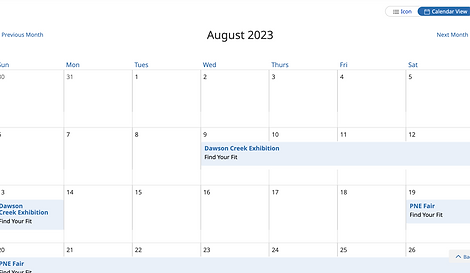
Calendar of Upcoming Events
-
Half of users were able to successfully find the ‘Calendar of Upcoming Events’ page using the website navigation.
-
Users who were unable to successfully locate the page expressed that they thought the page would have lived under ‘Explore Training & Education’, or ‘Research the Labour Market’.
-
It was noted by many users, that the option to view both calendar layouts was optimal; this would allow them to view detailed information (list view), while having a better sense of the event within the month (calendar view).
Design Details
WorkBC—Refreshed
By actively listening and learning from the British Columbians who participated in user testing, we were equipped with the insights necessary to drive the redesign of WorkBC in a direction that would best support the evolving needs, preferences and challenges of WorkBC’s diverse user group.
In collaboration with a fellow designer, I worked across a large variety of WorkBC pages, including those seen below, to develop iterative UX/UI concepts. Many of these concepts can be seen and used on the website today—including the Calendar of Upcoming Events.


Seen above: a small selection of pages from the redesigned WorkBC website.
Design Details
Designing for Mobile
Historically, WorkBC existed as a desktop-first website; however, with more and more British Columbians seeking access to career and employment related resources from their mobile devices—it was imperative that the redesign of WorkBC would be fully responsive: maintaining a seamless experience at any screen size. Our team was presented with a unique set of challenges relating to navigation and content prioritization when working to adapt WorkBC’s information-rich, desktop-first designs to suit the constraints of mobile devices. It was crucial to balance the presentation of extensive information, while ensuring that readability and intuitive interactions were not lost in the transition from desktop to smaller screens.


WorkBC Homepage

B.C. and Regional Profiles page

Calendar of Events page

Top Demand Trades page